You signed up. You created a vault. And now you're staring at an empty screen thinking: what goes in here?
You're not alone. It's the most common question we get from early users. The answer is simpler than you'd expect — but also broader than most people realise.
Your vault isn't a second password manager. It's the file your family opens when they're standing in your kitchen, phone in hand, trying to figure out what to do next. That context changes everything about what belongs in it.
Start with "The Key to Everything Else"
Most people already use a password manager. Good. Your vault doesn't need to duplicate it — it needs to unlock it.
Create a text file called something like how-to-access-my-passwords.txt and include:
- Which password manager you use (1Password, Bitwarden, whatever)
- Your master password or where to find it
- How to trigger emergency access, if your manager supports it
- Where your 2FA backup codes are stored (the physical ones, not the app)
- Your email password separately — because email is the skeleton key to everything else. Password resets, account recovery, bank notifications. If your family can get into your email, they can get into most things.
This single file is probably the most valuable thing in your vault. Everything else is a bonus.
The financial map your family actually needs
When someone dies or becomes incapacitated, the first financial question isn't "what's the portfolio allocation?" It's "where is the money, and how do we access it?"
Create a file that covers:
Bank accounts. Not just the name of the bank — the branch, the account numbers, whether it's joint or individual, and roughly what's in each one. Your family needs to know which account pays the mortgage and which one the electricity bill comes from.
Investments. Brokerage accounts, pension funds, savings accounts, retirement accounts. For each one: the provider, your account number, and a rough sense of the value. If you have a financial advisor, include their name and contact details.
Insurance policies. This is a big one. Over $10 billion in life insurance benefits have gone unclaimed because families didn't know the policies existed (according to the NAIC, the U.S. insurance regulator — and the pattern holds across Europe too). List every policy — life, health, home, car — with the provider, policy number, and what it covers. If you have income protection or critical illness cover, that's even more urgent because those need to be claimed quickly.
Debts and obligations. Mortgage (which bank, account number), outstanding loans, credit cards. Your family needs to know what's owed and to whom, not because they inherit your personal debt (usually), but because creditors will come looking and someone needs to respond.
Tax. Who does your taxes? Where are last year's returns? If you're self-employed, where are the invoices and records?
None of this needs to be a spreadsheet. A plain text file with clear headings works. The goal is that someone who has never seen your finances can get oriented in fifteen minutes.
Subscriptions and recurring bills
This is the stuff that keeps charging your card for months after you're gone. Nearly half of people forget what they're subscribed to while they're alive. Your family has no chance.
Make a list of anything that auto-charges. Group it by importance:
Keep running (critical): Mortgage/rent, utilities, phone plan, internet, cloud storage (if it has important files), domain names for any website you own.
Cancel soon: Streaming services, gym membership, app subscriptions, meal kits, software licenses.
Needs attention: Anything with an annual renewal — insurance, professional memberships, hosting. These are easy to miss because they only charge once a year.
For each one, note which card or account it charges. A three-column list — service, cost, payment method — saves your family hours of detective work through bank statements.
Crypto: the part that can't be recovered
If you hold cryptocurrency, this section matters more than any other in your vault. Crypto is the one category where getting it wrong means the money is gone. Not "hard to access." Gone.
Your family needs a document that assumes they know nothing about crypto. Because they probably don't.
Start with the basics:
What you own. Which coins/tokens, rough quantities, rough value. Not a live portfolio — just enough to know what they're looking for.
Where it's stored. For each wallet or exchange: the name, whether it's a hardware wallet (physical device) or software wallet, and where the device or app lives.
How to access it. This is where most people fail. For exchange accounts (Coinbase, Kraken, etc.), your login credentials and 2FA method. For hardware wallets, where the physical device is and how to use it. For any wallet: the seed phrase or recovery phrase. Write out every word, in order.
What to do with it. This matters more than you'd think. Does your family know how to convert crypto to actual money they can spend? Do they know about gas fees, network selection, or the fact that sending Bitcoin to an Ethereum address loses it forever? Write a short "if you need to sell this, here's how" section. Point them to a specific exchange, walk through the steps, or name someone who can help.
A warning about security. Tell your family not to share seed phrases with anyone who contacts them claiming to "help." Crypto scams targeting bereaved families are real and increasing.
Include a recovery guide. Your family probably doesn't know what a seed phrase does, let alone how to use one. Consider adding a short file called how-to-recover-a-wallet.txt that walks through the basics:
- Download [wallet name] from [official URL] — be specific, because fake wallet apps are common
- Choose "Restore wallet" or "Import using recovery phrase"
- Enter the 12/24 words from the seed phrase file, in order
- Wait for the wallet to sync — this can take minutes or hours depending on the network
- You should now see the balance
Write this for the specific wallets you actually use. Generic instructions aren't helpful when someone's hands are shaking. If you use multiple wallets (say, a Ledger for Bitcoin and MetaMask for Ethereum), write separate steps for each.
If you want, create a separate folder in your vault just for crypto. Keep the seed phrases in their own file, clearly labelled. This is the kind of information that justifies having a vault in the first place.
If you run a business
A study by researchers at the University of Warwick and University of Bergen found that a founding entrepreneur's death wipes out roughly 60% of a firm's sales on average. Even if your business is small — freelance work, a shop, an online store — someone needs to know how to keep things from falling apart.
Create a business continuity file:
Who to contact immediately. Your business partner, key employees, accountant, lawyer. If clients are expecting deliverables, who handles that?
How to access business systems. Email accounts, project management tools, hosting, domain registrar, payment processors, your CRM. Where are the admin credentials?
Financial obligations. Outstanding invoices (both owed to you and owed by you), payroll, tax deadlines, active contracts.
What can wait and what can't. If you have servers running, someone needs to keep them running. If you have a physical shop, someone needs to know the alarm code and where the keys are. If you have an employee, they need to get paid.
Who owns what. If you have a business partner, where's the partnership or operating agreement? What happens to the business legally if you're not there?
This doesn't need to be a full operations manual. It needs to be enough for someone competent to not break anything for a month while they figure out the rest.
The practical stuff that's easy to forget
Some of the most useful things in your vault aren't financial at all.
Device access — with a caveat. Phone PIN, laptop password, tablet code. Your phone is the filing cabinet of modern life — photos, insurance cards in email, contacts, bank apps. But here's the thing: with a 30-day check-in interval, your vault won't be released for 40+ days. By then, the urgent first-week scramble is over. Your family already dealt with the funeral home and the insurance calls without your phone.
That doesn't make device passwords useless in the vault — getting into a laptop two months later still matters for photos, local files, and ongoing account management. And if you're incapacitated rather than dead, there's no funeral-week rush at all. But for the day-one crisis? Share your phone PIN with someone you trust now, outside the vault. It's not sensitive enough to lock away, and your family will need it long before any vault gets released.
Home and car. Where are the house keys, the spare set, the car keys? What's the alarm code? What's the WiFi password? Where's the boiler manual? Who's your landlord, or your property management company? Where are the property deeds?
Important documents location. Where is your will? Your passport? Marriage certificate? Are they in a safe? What's the combination? Are they with your lawyer or notary? Which one?
Medical information. Your GP, any ongoing prescriptions, allergies, health conditions your family might need to tell paramedics. If you have an advance directive or power of attorney set up, where is it?
Pets. Vet details, medication schedules, food brand, insurance. Who takes the dog if nobody in the family can?
Personal messages
This is optional, and it's entirely yours.
Some people use their vault to leave letters. A note to a partner. Something for the kids to read when they're older. A thank-you to a friend. An explanation.
There's no template for this. You'll know if you want to write something. And if you don't, that's fine too.
How to structure all of this
Keep it simple. You don't need a complex folder hierarchy. Something like this works:
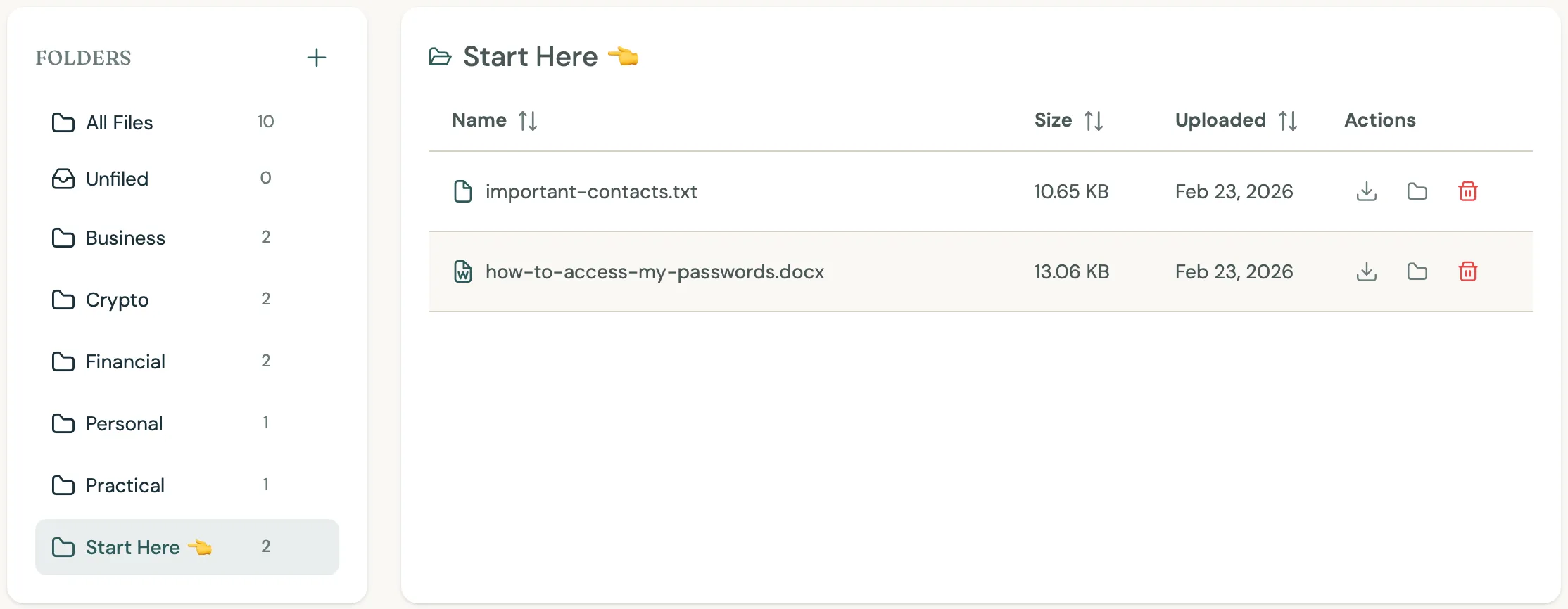
Here's the full breakdown:
Start Here
  └── how-to-access-my-passwords.txt
  └── important-contacts.txt

Financial
  └── bank-accounts.txt
  └── investments.txt
  └── insurance-policies.txt
  └── debts.txt
  └── subscriptions.txt

Crypto
  └── overview.txt
  └── wallet-access.txt
  └── seed-phrases.txt

Business
  └── continuity-plan.txt
  └── system-access.txt

Practical
  └── device-passwords.txt
  └── home-and-property.txt
  └── medical.txt
  └── document-locations.txt

Personal
  └── (whatever you want)
The "Start Here" folder is the most important design decision. When your family opens this vault, they'll be stressed, maybe grieving, definitely overwhelmed. Give them a clear starting point. The first file they open should tell them where to find everything else.
You don't need to do this all at once
The empty vault is intimidating. But you don't need to fill it in an afternoon.
Start with the password manager file. That alone is worth the price of admission. Next time you have twenty minutes, add the financial overview. The week after, do subscriptions. Build it up gradually. The vault is there whenever you're ready.
The only thing that matters is that it's not empty when someone needs it.
A note about keeping it current
A vault full of outdated information is almost worse than an empty one. Wrong passwords send your family down dead ends. Old account numbers waste their time with banks.
Set a reminder — once every six months works for most people. Open your vault, scan through it, update anything that's changed. New bank account? Add it. Changed your password manager? Update the file. Sold some crypto? Adjust the overview.
Trustbourne sends you check-ins anyway. Use one of those as your reminder to review.